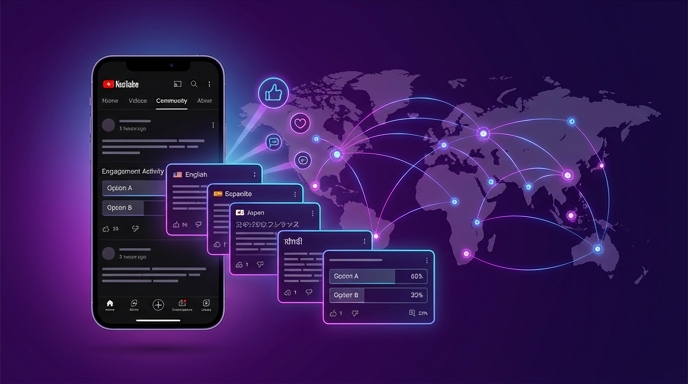
Community posts are YouTube's built-in social network. They appear in your subscribers' feeds between uploads. They drive engagement, gather feedback, and keep your channel top-of-mind when you're not publishing. A well-run Community tab builds loyalty that translates into higher view velocity on new uploads. But there's a problem most global channels ignore: Community posts are language-locked. When you publish a post in Russian, only your Russian-speaking subscribers can read and engage with it. Your Brazilian subscribers see it and scroll past. Your Indonesian viewers feel excluded. Your Turkish fans don't vote in polls they can't understand. You've worked hard to build a global audience. Your Community tab should serve all of them. Here's how to translate your posts and polls so every subscriber, in every language, feels like they're part of your community.
Why Community Posts Matter for Global Channels
Community posts aren't just a nice extra. They're a strategic tool that directly impacts your channel's performance. When subscribers engage with your posts — liking, commenting, voting in polls — YouTube's algorithm registers that engagement as a signal of an active, healthy channel. Active channels get more recommendation priority. More priority means more distribution. More distribution means more growth.
But engagement only happens when subscribers understand what you're posting. A Russian-language poll about your next video topic excludes every subscriber who doesn't read Russian. That's potentially 60-70% of your audience if you've successfully gone global. You're leaving engagement on the table. Worse, you're subtly telling your international subscribers that they're second-class members of your community. The Russian speakers get polls. The Portuguese speakers get ignored. That's not a global channel. That's a Russian channel with some translated videos.
Translating Community posts fixes this. A poll in Russian AND Portuguese AND Indonesian invites every subscriber to participate. A translated update about your upload schedule keeps every viewer informed. A multilingual behind-the-scenes post makes every fan feel included. The engagement compounds. The algorithm notices. The growth continues.
What to Translate in Community Posts
Text Posts
The main body of your post. Keep it concise — Community posts have limited text display before the "read more" cutoff. Write in clear, simple sentences that translate well. Avoid idioms, slang, and cultural references that won't cross language barriers. A post like "New video tomorrow! Here's a sneak peek of what I'm working on" translates cleanly into any language. A post like "Скоро запилю новый видос, готовьтесь к жаре" does not.
Polls
Polls are the highest-engagement Community post format. Viewers love voting — it's one tap, zero effort, instant participation. But a poll in one language only captures votes from one language group. Translate your poll question AND all answer options. Every option needs to be readable in every language. A four-option poll translated into 100 languages is 400 translated items. VidLocalizer handles this. Don't skip answer translations — an untranslated option might as well not exist for that language audience.
Images with Text
Community posts support images. If your image contains Russian text, it won't be understood by international subscribers. For global posts, use images that are visual rather than text-dependent. Photos, screenshots without text overlays, emojis, and graphics that communicate without language. If you must include text, keep it minimal and consider creating multiple image versions for your top languages. The image itself can't be translated by VidLocalizer, but the post text surrounding it can be.
Links
URLs are universal. A link to your latest video works in every language. Just make sure the surrounding text explains what the link is. "New video live now:" followed by a link translates cleanly. The link itself doesn't need translation — YouTube handles the destination regardless of the viewer's language settings.
How to Structure Posts for Translation
Write your original post in Russian. Then translate it into your target languages. But writing for translation is a skill. Here are the rules:
- Short sentences translate better than long ones
- Active voice translates better than passive voice
- Simple words translate better than complex vocabulary
- Universal concepts translate better than cultural references
- Questions translate well and drive engagement
- Emojis are universal — use them strategically
Before publishing, read your post and ask: would this make sense to someone who lives in Brazil and has never been to Russia? If the answer is no, rewrite it. Global posts are globally understandable posts.
Step-by-Step: Translating and Publishing Multilingual Community Posts
Step 1: Write Your Original Post
Compose your post in Russian using the guidelines above. Keep it simple. Keep it universal. Write with translation in mind.
Step 2: Translate Through VidLocalizer
VidLocalizer supports Community post translation. Write or paste your post text into the tool. Select all 100+ languages. Generate translations. For polls, enter the question and each answer option separately — the tool will translate all of them. Review a few translations to confirm quality. Edit if needed. Push the translations to your content queue.
Step 3: Publish in Batches by Language
YouTube doesn't currently support publishing one Community post in multiple languages simultaneously through the native interface. The workaround: publish separate posts for each language group. Schedule them to appear at different times to avoid flooding your feed. Alternatively, publish one post with the text in multiple languages separated by dividers or language labels. This is less elegant but ensures every subscriber sees a version they can read. Many global creators use a format like:
"EN: What should my next video be about? Vote below!
PT: Qual deve ser o próximo vídeo? Vote abaixo!
ID: Video apa selanjutnya? Pilih di bawah!
[Poll options in multiple languages]"
Step 4: Monitor Engagement by Language
After publishing, check the comments and votes. Are certain language groups engaging more than others? Are specific types of posts resonating globally? Use YouTube Studio's analytics to track Community post performance. The data will tell you which markets are most engaged and which content types drive the most interaction.
The Engagement Flywheel
Multilingual Community posts create an engagement flywheel that feeds your entire channel. International subscribers who feel included engage more. Higher engagement signals channel health to the algorithm. Better algorithm signals improve video distribution. Better distribution brings more international viewers. More international viewers become subscribers who want to be included. Translated posts include them. The flywheel spins.
This is the missing piece in most global YouTube strategies. Creators translate their videos but forget their posts. They build international audiences but only talk to their domestic subscribers between uploads. The Community tab is where loyalty lives. Make it multilingual. Make every subscriber feel like they belong. Your global audience isn't just a view count. It's a community. Communities deserve to be spoken to in their own language.
Localize your YouTube channel today
3-day free trial · 80+ languages · cancel any time